

Project Barricor
A downloadable game
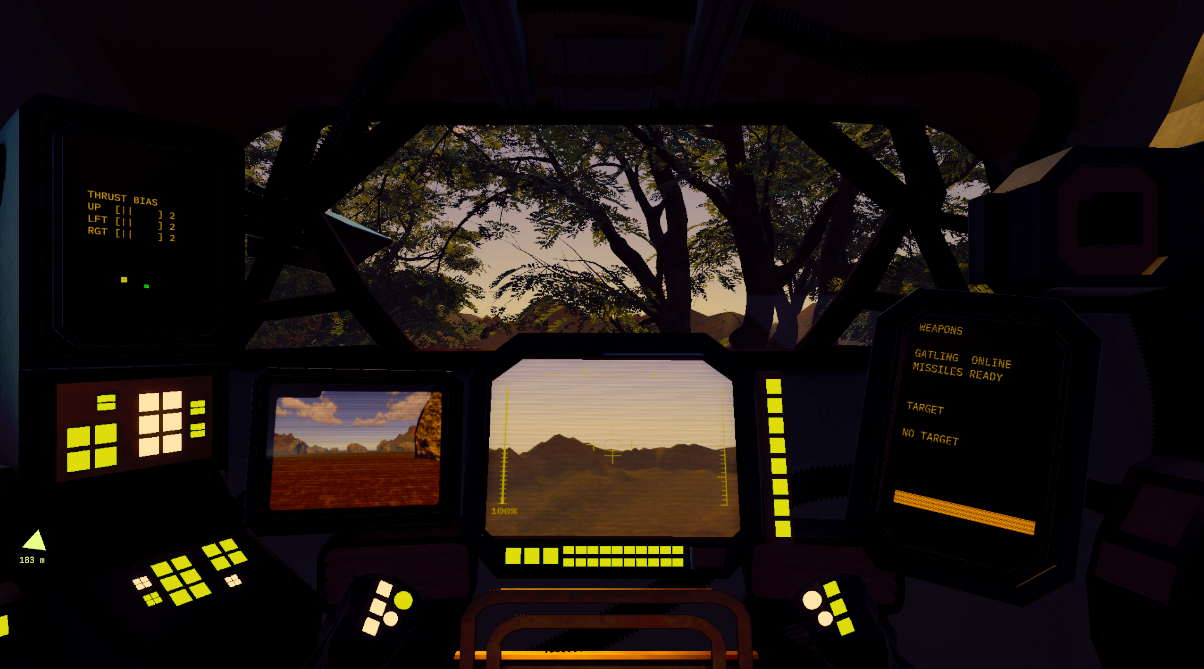
Following the events with Corvus, Dex, Vola, and Sabr press on to uncover the secrets behind the MVs. Vola has secured a Barricor MV unit for Sabr to test — and with Dex on the comms, Sabr gets to feel the weight, the grit, and the surprising agility of the Barricor unit. Their test is cut short, of course, by corporations and their endless conflicts.
Controls
Keyboard & mouse defaults below — all rebindable in the pause menu, and full gamepad support.
Piloting
- WASD — Move · Mouse — Look
- Shift — Fast Walk / Dash
- C — Cruise (toggle) · Ctrl — Overboost
- Space — Jump / Thrust (hold in the air to glide)
- Q / E — Quick Turn (left / right)
- Arrow Keys — Thrust bias, "the pip" (Up / Left / Right to load a side, Down to reset)
Combat & System
- LMB — Fire · RMB — Aim · MMB — Missile
- G — Grapple / Anchor
- Esc — Pause / Settings / Rebind keys
Dex walks you through every system as you go, so don't worry about memorizing this. Gamepad is fully supported, and every keyboard input can be changed in the pause menu.
Performance & Settings
Press Esc for graphics settings (clouds, shadows, volumetric fog, props, detailed trees, FSR), audio mix, look sensitivity, and full key rebinding. On weaker hardware, switch the heavy options off there. Runs great on Steam Deck via Proton 9 or Experimental.
Notes
This build is mostly a tech showcase for some of the tools I've been building. Apart from the nature assets (which, I realized partway through are photogrammetry) and the SFX, everything here is mine: a custom terrain generator, an early-development volumetric cloud system from another project of mine, and the whole mech movement feel. I ran into plenty of issues right off the bat, but I got something out of taking part in the gamejam. This is my second MechJam, last time was MechJam V with Armored Souls (on another personal account). Hope you enjoy it.
Credits
Nature assets — Poly Haven (CC0), photogrammetry.
Sound (via freesound.org):
- SCIVeh Vehicle Pass-By Whoosh 01 — KVV_Audio — 852755 — CC BY 4.0
- Metal Bullet Ricochets — mikiko850 — 854335 — CC BY 4.0
- Quadcopter Drone Flyby — qubodup — 854352 — CC0
- Destruction of the Missile — the_yura — 741267 — CC0
- Monster Stomp Footsteps Sequence — Vilkas_Sound — 753178 — CC BY 4.0
- thrusters_loop — DJT4NN3R — 347576 — CC0
- Gravel Gentle Spilling on Metal — Robinhood76 — 169258 — CC BY-NC 4.0
- Compressed Air — Rodzuz — 393901 — CC0
- Complex Minigun Spin-Up Firing — Hybrid_V — 320742 — CC BY-NC 4.0
- blippy — kaboose102 — 340259 — CC0
Font — IBM Plex Mono.
Download & Install
- Windows / PC — Download and extract the archive, then run the executable.
- Steam Deck — Download and extract, then in Steam use Add a Non-Steam Game and point it at the extracted executable. Open that game's Properties, then Compatibility, tick Force the use of a specific Steam Play compatibility tool, and select Proton 9 or Proton Experimental.
Download
Leave a comment
Log in with itch.io to leave a comment.